stage untopped waffle or pancake bases before a shift, then finish each only after its ticket is known.
Normal service, interrupted
The observed loop moves from register to Orders board to cooking to tables. CCTV checks, urgent timers, and maintenance events can overlap that same line.
Observed service path
Four handoffs run the shift
This is a reading of visible UI and actions, not a developer-authored ruleset.
- 01INTAKE
Open HUD → Accept Order
The active HUD shows reputation, day, and Open status. The register uses a dedicated Accept Order interaction and a numeric Take Orders counter.
- 02PRODUCTION
Orders board → bowl → cooking surface
Accepted orders appear on the kitchen board. Ingredients combine at the bowl; waffles and pancakes use their own cooking surfaces and visible doneness bars.
- 03SERVICE
Carry → booth → cleanup marker
Finished waffles, pancakes, and coffee are carried to waiting or seated customers. Used dishes remain on tables with a cleanup interaction.
- 04INTERRUPTION
CCTV → shutter → resume
The eye-marked laptop opens CCTV, CAM 1 changes the viewing angle, and the shutter closes a metal barrier across the front counter.
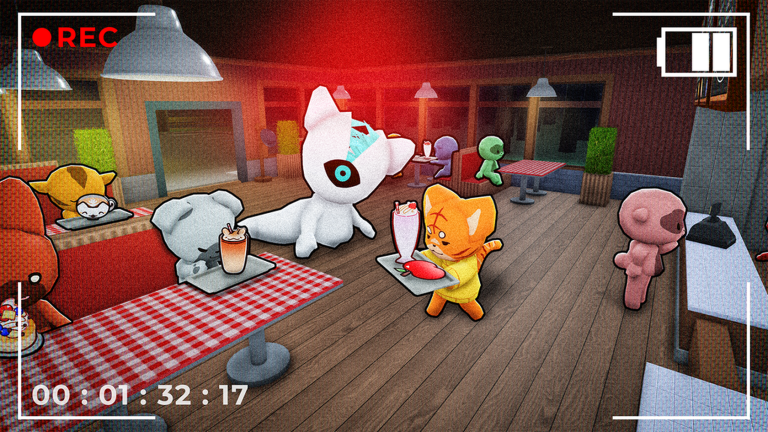
CAM 1 can show one or more customers near the service counter. Some abnormalities are demonstrated only in CCTV.
Interrupt layer
The board keeps moving while the cafe breaks
Footage shows urgent countdowns and an active Coffee ticket continuing during maintenance. The maintenance page explains the failure points; the strategy panel below explains the approved response suggestions.
EDITORIAL STRATEGY
Six approved operations recommendations
These are recommendations derived from observed systems. They are not official rules or guaranteed mechanics.
treat the kitchen Orders board as the shared source of truth when several tickets are active.
divide a team into checker, cooker, and waiter responsibilities during busy shifts.
pause routine prep for power or freezer repairs when they block the shared kitchen workflow.
restore sanity with staff coffee during a lull rather than waiting until the HUD is critically low.
clear a dirty plate on each return trip through the dining room so end-of-shift cleanup does not become a blocker.
VERIFIED OBSERVATIONS
14approved factsService-loop evidence
These 14 facts cover the observed HUD, register counters, order production, table service, cleanup markers, and customer flow.
Service loop10
- AC-116
The active-shift HUD simultaneously shows cafe reputation, the current day, and an Open status.
Place-linked gameplay - AC-120
After accepting the tutorial order, the objective changes to Make Batter.
Place-linked gameplay - AC-122
Completed food is delivered to a seated customer at a dining table.
Place-linked gameplay - AC-127
Prepared ingredients are combined at an interactable mixing bowl station.
Place-linked gameplay - AC-131
A completed waffle is served to a customer already seated in a booth.
Place-linked gameplay - AC-132
Used dishes remain on dining tables with a cleanup interaction marker.
Place-linked gameplay - AC-138
The front counter shows a numeric Take Orders counter during a shift.
Place-linked gameplay - AC-151
A finished pancake is carried to and served at a customer's booth.
Place-linked gameplay - AC-182
The service HUD separately displays a numeric Serve Orders counter at the front desk.
Place-linked gameplay - AC-195
A prepared Coffee order is delivered directly to a waiting customer.
Place-linked gameplay
Customer flow4
- AC-118
Bonny is the named character who delivers the opening tutorial dialogue.
Place-linked gameplay - AC-149
More than one customer can wait at the service counter simultaneously.
Place-linked gameplay - AC-165
A pancake can be served to a booth customer while another diner remains seated nearby.
Place-linked gameplay - AC-179
Two nearly identical red customers can be visible together in the dining room.
Place-linked gameplay